


YouTube CPM Campaigns in 2026: Views, ROI & Smarter Marketing
YouTube CPM Campaigns in 2026: Why More Views Don't Always Mean Better Marketing
The economics of YouTube attention, the difference between views and customers, and how smarter campaign operations can create a competitive advantage.
The Most Expensive YouTube View Is the One That Leads Nowhere
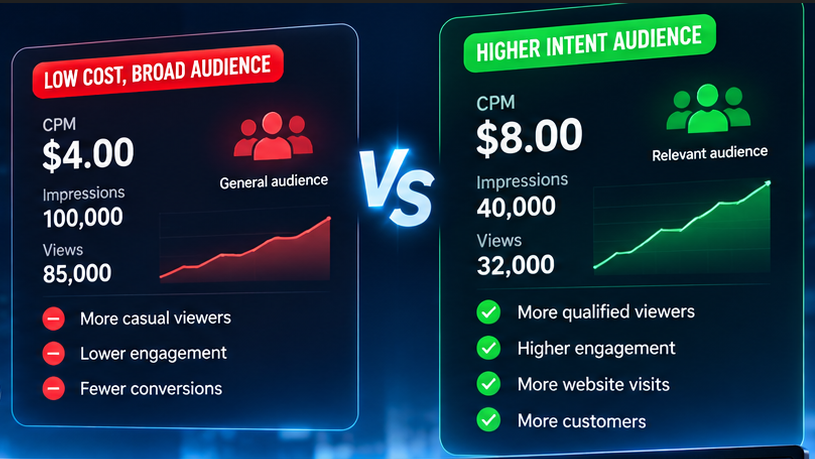
Imagine two companies advertising the same product on YouTube.
Company A reaches 100,000 viewers at a CPM of $4.
Company B reaches 40,000 viewers at a CPM of $8.
At first glance, Company A appears to have the better campaign. It reaches more people at half the cost per thousand impressions.
But what happens when we look beyond the view count?
Company A attracts a broad audience. People watch, scroll away, and rarely return.
Company B reaches a smaller audience of people actively researching the product. Some visit the website, compare specifications, and request quotations.
Which company actually won?
The answer depends on what happened after the impression.
CPM tells you how much attention costs. It doesn't tell you how much that attention is worth.
That distinction changes how businesses should think about YouTube marketing.
YouTube CPM Is a Price, Not a Marketing Strategy
CPM means cost per thousand impressions.
For advertisers, it helps measure the cost of delivering advertising impressions to an audience.
For YouTube creators, CPM is also used in monetization reporting, although creator-side CPM and advertiser costs are not identical measurements.
A lower CPM can make a campaign more economical. But it cannot answer several questions that matter to a business:
Did the campaign reach people who might actually buy?
Did viewers understand the product or service?
Did the video answer an important purchasing question?
Did the audience take a meaningful next step?
Did the campaign generate business value relative to its total cost?
A low CPM is attractive only when the impressions contribute to a useful outcome.
The Difference Between Cheap Reach and Valuable Reach
Consider a company selling commercial cleaning equipment.
Its potential buyers are not simply people who enjoy watching cleaning videos.
They may be hotel operators, facility managers, procurement teams, cleaning contractors, or business owners.
A video showing a machine in action might attract thousands of casual viewers.
But a video explaining operating costs, maintenance requirements, cleaning capacity, and the differences between two equipment models may attract fewer viewers with stronger purchasing intent.
The second video could be considerably more valuable.
The best audience is not always the largest audience. It's the audience with a reason to care.
What Buyers Don't Tell You: Their Search Behavior Reveals Their Objections
One of YouTube's biggest marketing advantages is that people use video to investigate products before making decisions.
A buyer may search for:
A product demonstration.
A comparison between competing models.
Common maintenance problems.
Real operating costs.
Installation requirements.
Performance under different conditions.
These searches reveal something valuable: the questions buyers need answered before they are comfortable purchasing.
For a manufacturer or distributor, this creates an opportunity.
Instead of producing another generic promotional video, the company can create content that removes a specific purchasing objection.
A comparison video may help buyers narrow their choices.
A maintenance demonstration may reduce concerns about reliability.
A practical buying guide may help a purchasing manager justify a decision internally.
The marketing value comes from addressing uncertainty.
A Smarter Content Strategy for YouTube Campaigns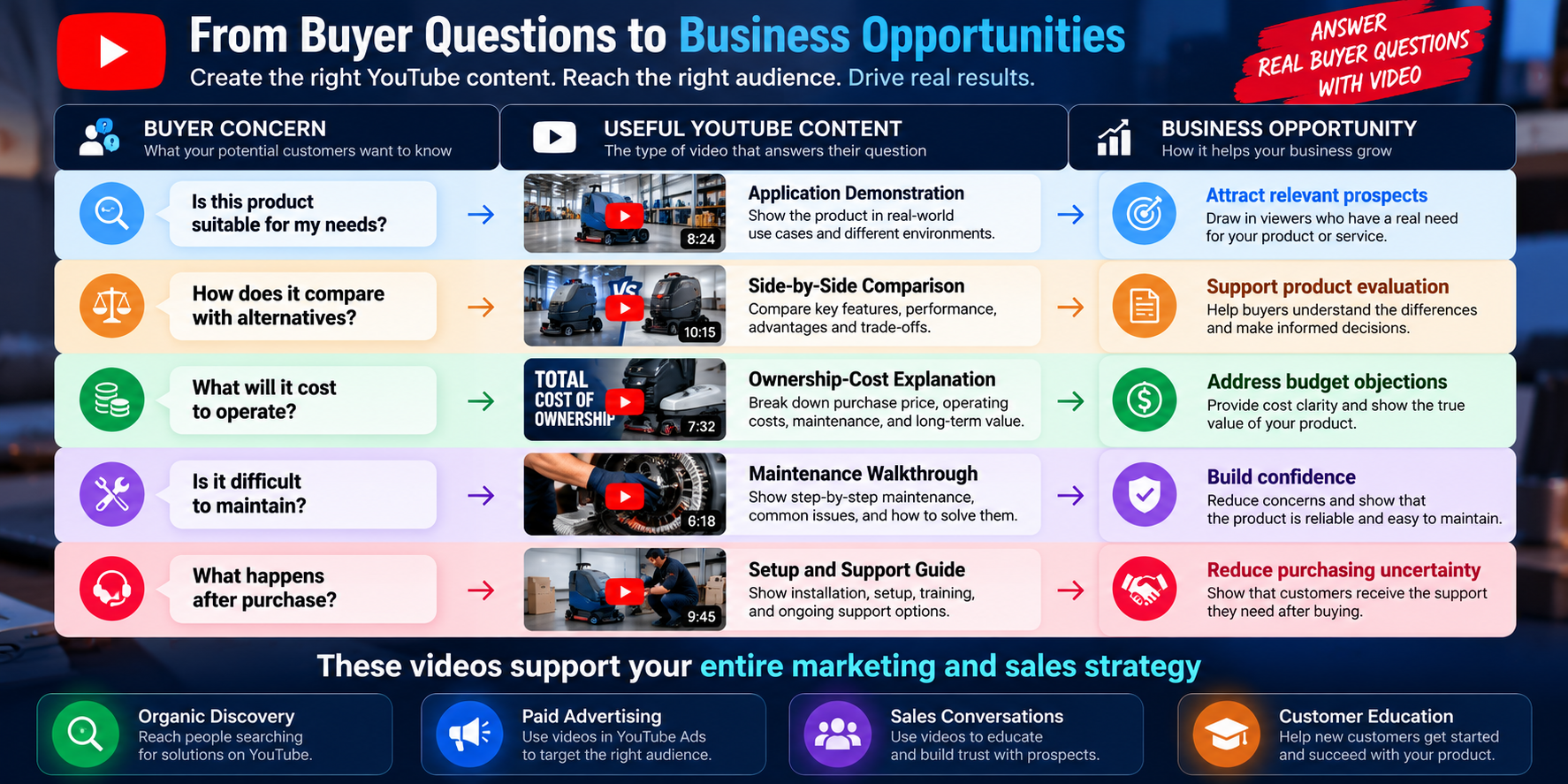
The important point is that the content serves a business purpose beyond generating views.
The Hidden Cost of a YouTube Campaign Is Not Always the Advertising Budget
Marketing teams naturally focus on media spending.
But as a campaign grows, operational costs become increasingly important.
Someone has to prepare the videos, review descriptions, manage accounts, organize browser sessions, coordinate publishing, check campaign results, and report to clients or management.
A small business might handle these activities manually.
An agency working across several brands, regions, or YouTube channels faces a more complicated challenge.
Its team may spend more time switching accounts, checking settings, and organizing repetitive work than analyzing what actually makes a campaign successful.
This creates an important distinction:
Advertising efficiency measures what you spend to reach an audience. Operational efficiency measures what it costs your team to run the campaign.
A business needs to pay attention to both.
When YouTube Marketing Expands Across Multiple Accounts
Consider a marketing agency supporting several product categories.
One client sells industrial equipment. Another offers online education. A third operates in travel and hospitality.
Each brand has different content, audiences, publishing requirements, and reporting needs.
Keeping these environments separate becomes part of the agency's operational discipline.
This is where <Entity category="software" value="MarketerBrowser" disambig="multi-account browser profile management software"/> can contribute.
MarketerBrowser helps businesses manage separate browser profiles, maintain account sessions, configure proxies, and organize browser environments.
Rather than repeatedly switching between unrelated accounts in one browser, teams can maintain dedicated profiles for authorized account management.
For an agency, that can make day-to-day work easier to organize.
MarketerBrowser's Pro plan includes unlimited browser profiles, while higher plans offer capabilities such as the Advanced API and Master Control Program.
The number of profiles that can operate simultaneously still depends on the computer, browser workload, and execution environment.
But the more important business benefit is having a structured way to manage multiple account environments.
Explore MarketerBrowser.
Why the Next Competitive Advantage Is Workflow Intelligence
Most marketing teams already have access to content tools, advertising platforms, and analytics.
The difficult part is connecting the information.
Imagine a YouTube campaign where the team can identify a promising buyer question, develop a relevant video, approve its claims, distribute it through the appropriate channels, and evaluate its results.
Now imagine repeating that process across several products and markets.
The business no longer needs just another dashboard.
It needs a repeatable workflow that connects research, content, execution, and measurement.
For example:
Market evidence → Buyer questions → Video strategy → Content production → Human review → Campaign distribution → Performance analysis
AI can help organize research, draft scripts, and identify possible content angles.
People still need to verify claims, approve creative work, and make commercial decisions.
Advertising performance should be evaluated through the appropriate reporting systems, including Google Ads for paid YouTube campaigns.
The result is a marketing operation built around informed decisions rather than activity volume alone.
Where YouTube Automation Fits Into the Picture
Not every YouTube task requires a person to repeat the same steps manually.
Publishing preparation, scheduling, account organization, and execution monitoring can all create opportunities for appropriate automation.
For businesses that require supported social media workflows, <Entity category="software" value="JarveePro" disambig="social media management and automation software"/> offers YouTube-related features, including publishing workflows and Watch Video tasks.
These features serve different operational purposes.
A Watch Video task is not equivalent to a paid Google Ads impression, and automated viewing does not establish legitimate CPM performance or monetization results.
For a business focused on genuine marketing outcomes, the most valuable automation is often the work that helps its team consistently prepare, publish, coordinate, and review useful content.
That is how automation can support a broader YouTube strategy.
The Opportunity Most Agencies Overlook: Custom Development
Off-the-shelf software is designed to serve many customers.
But successful agencies often develop workflows that are specific to their clients, industries, and internal processes.
For example, a company might want to connect its product database to a content planning system.
A marketing agency might need a dashboard that organizes browser profiles by client and shows which approved content is ready for publication.
A manufacturer might want an internal process that turns verified product specifications and common buyer questions into draft video briefs for human review.
A multi-brand business might need standardized reporting across several teams.
These are not necessarily features that should be added to every software product.
They are opportunities for custom development.
From Software Features to Business-Specific Systems
MarketerBrowser Ultimate includes Advanced API and Master Control Program capabilities that can be evaluated for supported browser-management integrations.
JarveePro also provides integration capabilities for supported social media operations.
Custom development can explore ways to connect documented functions with a company's own systems.
The value is not simply automating another click.
It is reducing the distance between a business decision and the approved work required to carry it out.
For example, a custom workflow could help a company:
Organize approved video assets by product, client, or market.
Associate browser profiles with the appropriate business accounts.
Track internal content approvals.
Coordinate supported publishing workflows.
Consolidate available execution records for operational reporting.
Connect marketing data with an existing customer-management process.
The exact scope depends on the APIs, permissions, and integrations available.
This is particularly valuable for businesses whose processes have become too specialized for a generic software setup.
A Better Way to Measure YouTube Marketing Success
Imagine a company launching a new product.
It produces three types of videos.
The first introduces the product and reaches a broad audience.
The second demonstrates how the product solves a specific problem.
The third answers detailed questions about specifications, cost, and implementation.
The introductory video might generate the most views.
The demonstration might produce more website visits.
The detailed explanation might contribute to the most qualified inquiries.
If the company judges success only by CPM or total views, it could underestimate the value of the latter two videos.
A better measurement framework considers the entire customer journey.
| Marketing stage | Useful measurements |
|---|---|
| Awareness | Impressions, reach, view rate |
| Interest | Watch time, engagement, relevant website visits |
| Evaluation | Product-page visits, downloads, qualified inquiries |
| Conversion | Leads, sales, cost per acquisition |
| Operations | Publishing completion, account status, team workload |
Not every campaign needs every measurement.
But the business should know which outcome matters before deciding whether a campaign is successful.
The Future of YouTube Marketing Belongs to Businesses That Understand Attention
YouTube is not simply a place to accumulate views.
It is a place where people discover products, compare alternatives, learn new skills, and make decisions.
CPM helps businesses understand the price of reaching those people.
Content strategy determines whether the message is relevant.
Operational systems determine whether campaigns can be managed consistently.
And custom development can help connect those activities when standard tools no longer meet the company's requirements.
That is where MarketerBrowser, supported automation, and tailored integrations can become useful parts of a larger marketing operation.
The real advantage isn't being able to run more accounts or generate more activity. It's understanding which activities create value—and building a system that helps your team repeat them.
Build a Smarter YouTube Marketing Operation
Whether you're managing a few brand channels or coordinating marketing across multiple clients, the right infrastructure should make your work easier to organize and your decisions easier to evaluate.
Explore MarketerBrowser for multi-account browser management, advanced integration options, and custom workflow possibilities.
For supported YouTube publishing and social media automation, discover JarveePro.
If your business requires a workflow that standard software doesn't provide, custom development may be the next step toward connecting your tools, people, and marketing operations.