


How to Choose the Right Proxy for an Anti-Detect Browser in 2026: Residential vs. Datacenter vs. Mobile
Introduction: The Proxy Question Most Anti-Detect Browser Users Eventually Ask
Choosing an anti-detect browser is only one part of building a reliable browser profile environment.
Sooner or later, most users face another question:
What type of proxy should I use?
Residential? Datacenter? Mobile? Static ISP?
The answer depends heavily on what you are trying to do.
A proxy is not simply a tool for changing your IP address. In an anti-detect browser environment, it becomes part of the broader identity associated with a browser profile. The IP address, geographic location, timezone, language, device configuration, and browser fingerprint should all make sense together.
This is why choosing the most expensive proxy is not always the best solution.
A high-quality datacenter proxy may be perfect for research. A stable residential proxy may be better for a long-term browser profile. A mobile proxy may make sense for workflows that closely resemble mobile network activity.
The goal is not to find the “strongest” proxy.
The goal is to find the right proxy for the job.
What Is an Anti-Detect Browser?
An anti-detect browser is designed to allow users to create and manage separate browser profiles with isolated digital environments.
A standard browser typically shares the same basic browser environment across sessions. An anti-detect browser allows each profile to maintain its own configuration, which may include:
- Browser fingerprint
- Operating system configuration
- Screen resolution
- Timezone
- Language
- WebGL settings
- Canvas settings
- User-agent configuration
- Cookies and local storage
- Proxy connection
The purpose is profile isolation.
For example, a marketer managing different projects may want each project to have a separate browser environment rather than mixing every account, cookie, login session, and configuration into one browser.
This is where tools such as MarketerBrowser become useful. Instead of treating every online identity as one shared browser session, users can organize different profiles into separate environments.
But there is an important point: An anti-detect browser and a proxy solve different problems.
The browser controls the browser environment.
The proxy controls the network connection.
A strong setup considers both.
Why Does Your Proxy Matter?
Imagine a browser profile configured with:
- A device located in Los Angeles
- A Pacific Time timezone
- English language settings
- A residential IP address from California
That configuration is reasonably consistent.
Now imagine the same browser profile suddenly connects through:
- A datacenter IP in another country
- A timezone that does not match the IP location
- A completely different region after every session
The profile now contains multiple conflicting signals.
This does not automatically mean that something will go wrong. However, consistency is generally easier to manage than constantly changing environments.
A proxy can influence:
- The apparent geographic location of a connection
- The network provider associated with the connection
- IP reputation
- Connection stability
- Speed
- Session persistence
That is why proxy selection should be part of your overall browser-profile strategy.
The Three Main Proxy Types
Let's look at the three most commonly discussed proxy categories.
1. Datacenter Proxies
Datacenter proxies are provided through data center infrastructure rather than typical residential internet connections.
Advantages
Datacenter proxies are usually known for:
- High speed
- Low latency
- Affordable pricing
- Large-scale availability
- Excellent scalability
They are often a strong choice when speed and volume are the primary concerns.
Best Use Cases
Datacenter proxies can be suitable for:
- SEO research
- Website testing
- Public data collection
- Price monitoring
- Market research
- High-volume browsing
- Development and testing environments
For many public-facing tasks, datacenter proxies are an extremely practical option.
The Tradeoff
The main tradeoff is that datacenter IP ranges can be easier to identify as hosting infrastructure.
That does not make every datacenter proxy “bad.” It simply means the IP belongs to a different category of network than a typical home internet connection.
The important question is:
Does the use case actually require a residential IP?
If the answer is no, a datacenter proxy may be the faster and more economical choice.
2. Residential Proxies
Residential proxies use IP addresses associated with residential internet connections.
This makes them attractive for workflows where the network identity is expected to resemble a typical home internet user.
Advantages
Residential proxies generally offer:
- Consumer ISP association
- Geographic flexibility
- Better suitability for many consumer-facing websites
- A more natural residential network profile
They are often selected for:
- E-commerce research
- Consumer websites
- Market research
- Regional browsing
- Long-term browser profiles
- Business account management
For many users, residential proxies are the middle ground between affordability and network authenticity.
Static Residential and ISP Proxies
One important distinction is whether the residential IP is stable.
A rotating residential proxy may change IP addresses frequently.
A static residential or ISP proxy is designed to maintain a more consistent network identity.
For a long-term browser profile, stability can be extremely valuable.
Consider a profile that you use regularly over a period of months.
A stable connection can make it easier to maintain:
- Consistent geographic context
- Predictable session behavior
- A stable login environment
- Consistent connection history
This is why static ISP or residential proxies are often attractive for long-term browser profiles.
A rotating proxy may be useful when you need a large number of IP addresses.
A static proxy may be better when you need one consistent identity.
3. Mobile Proxies
Mobile proxies use IP addresses associated with mobile carrier networks.
These networks are fundamentally different from traditional data center infrastructure.
Mobile IP addresses may be shared across many users, and carrier networks often have their own unique characteristics.
Advantages
Mobile proxies may be useful for:
- Mobile-oriented workflows
- Mobile network testing
- Geographic testing
- Certain consumer-focused use cases
- Scenarios where carrier-network connectivity is important
The Tradeoff
Mobile proxies are typically more expensive than datacenter proxies.
They may also have:
- Higher costs
- Different performance characteristics
- More limited availability
- Less predictable speeds
The key point is that mobile proxies should not automatically be considered “better.”
They are simply a different type of network.
Residential vs. Datacenter vs. Mobile
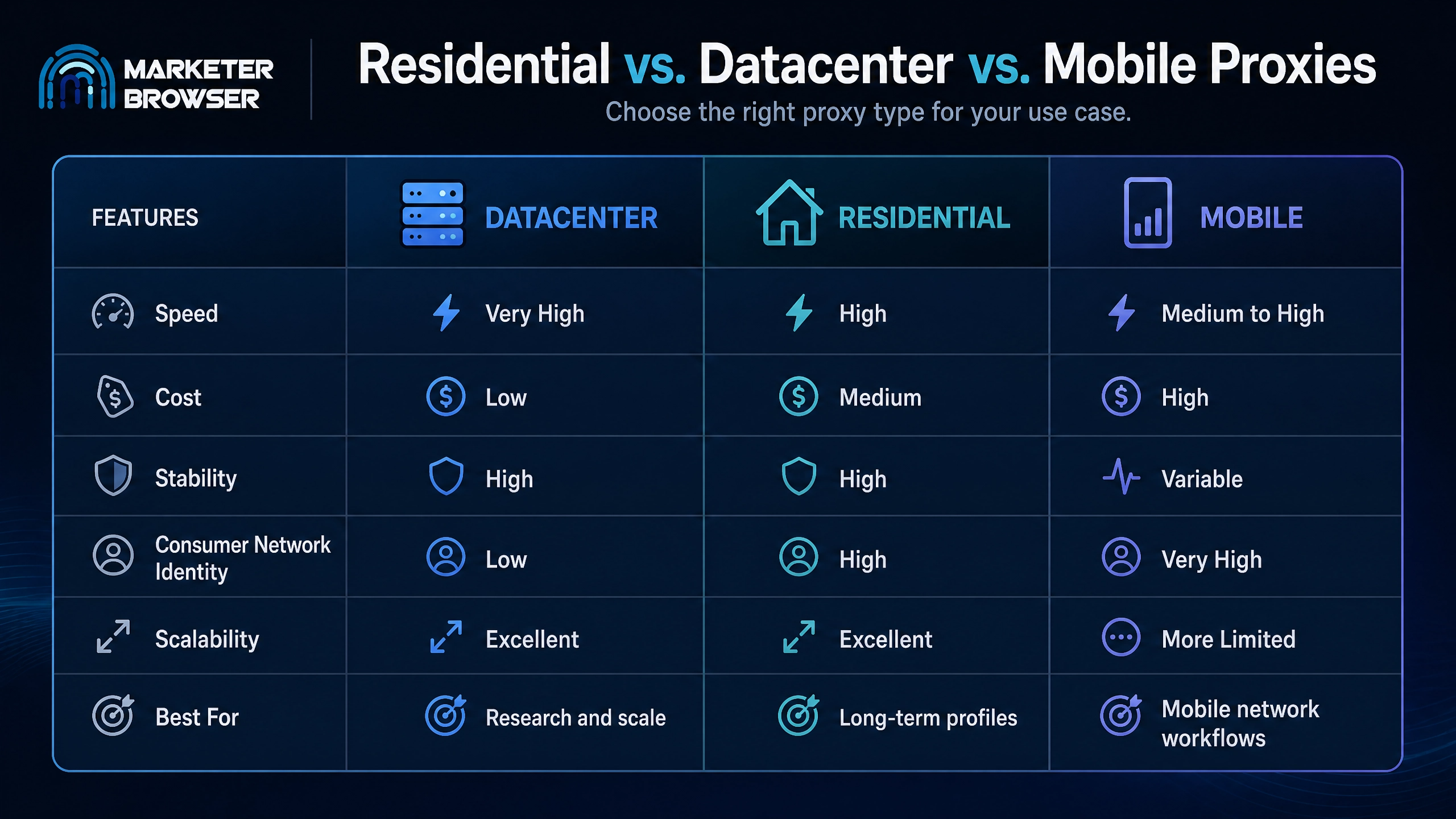
There is no universal winner.
The best choice depends on the job.
How to Choose the Right Proxy for Your Use Case
For SEO Research and Market Research
Recommended starting point: Datacenter
If you are researching search results, analyzing websites, checking regional content, or collecting publicly available information, speed and scalability may be more important than having a residential network identity.
Datacenter proxies can be an efficient option.
For Long-Term Browser Profiles
Recommended starting point: Static Residential or ISP
If a browser profile is intended to maintain a consistent long-term environment, stability is often more important than constantly changing IP addresses.
A static connection can simplify profile management.
For E-Commerce Research
Recommended starting point: Residential
E-commerce websites are often highly regional.
A residential proxy can be useful when researching:
- Local pricing
- Regional availability
- Search results
- Product listings
- Geographic differences
For Mobile Network Testing
Recommended starting point: Mobile
If the purpose of the workflow is specifically to test a mobile-network environment, a mobile proxy is the most logical choice.
The proxy should match the testing objective.
For Large-Scale Data Collection
Recommended starting point: Datacenter or Residential
The choice depends on the website and the scale of the project.
For speed-sensitive public research, datacenter proxies may be more efficient.
For websites where residential network identity matters, residential proxies may be more appropriate.
The Most Important Principle: Consistency
Proxy type is important.
But consistency may be even more important.
A browser profile should ideally have a logical relationship between:
- IP location
- Timezone
- Language
- Browser settings
- Device configuration
- Session history
For example, a profile with a United States IP address, English language settings, and a U.S. timezone creates a more coherent configuration than a profile with several unrelated geographic signals.
The goal is not to create an elaborate fantasy identity.
The goal is to avoid unnecessary contradictions.
This is where an anti-detect browser such as MarketerBrowser can become particularly useful. Separate profiles can be organized with their own browser environments, cookies, settings, and network configurations.
The more organized the environment, the easier it becomes to manage.
One Profile Does Not Always Mean One Proxy
There is no universal rule that every browser profile must use exactly one proxy forever.
The right setup depends on the use case.
However, for long-term browser profiles, many users prefer a stable relationship between a profile and its network connection.
This can make it easier to understand:
- Which profile uses which proxy
- Which geographic region is associated with the profile
- When a connection changed
- Whether a login came from an expected location
For complex operations, organization is not a minor detail.
It is infrastructure.
Common Proxy Mistakes
Choosing the Most Expensive Proxy Automatically
More expensive does not automatically mean more appropriate.
A mobile proxy may be unnecessary for a simple research task.
A datacenter proxy may be perfectly adequate for a public data workflow.
Choose according to the task.
Constantly Changing IP Addresses
Frequent changes can make a profile more difficult to manage.
For long-term sessions, consistency may be more useful than endless rotation.
Ignoring Geographic Settings
If your proxy is associated with one region but your browser profile is configured for another, the environment may become inconsistent.
Timezone and language settings should be considered alongside the proxy location.
Using Low-Quality Proxies
Cheap proxies can sometimes come with:
- Poor reliability
- Slow connections
- Bad IP reputation
- Frequent disconnections
The cheapest option is not always the lowest-cost option in the long run.
Treating the Proxy as the Entire Identity
A proxy is only one part of a browser environment.
A browser profile may also contain:
- Cookies
- Local storage
- Browser fingerprint parameters
- Device configuration
- Login history
- Language settings
- Timezone information
The proxy is important, but it is not the entire system.
How MarketerBrowser Fits Into the Picture
A proxy changes the network layer.
An anti-detect browser manages the browser-profile layer.
Together, they allow users to organize separate digital environments for different projects and workflows.
MarketerBrowser is designed around browser profile isolation and management, allowing users to create separate environments rather than placing every account and project into one shared browser session.
For marketers, agencies, researchers, and teams managing multiple browser environments, this organization can be extremely valuable.
Instead of asking: “Which browser should I use for everything?”
The better question is: “How should each browser profile be organized for its specific purpose?”
That shift in thinking is increasingly important as online services become more sophisticated.
A Simple Decision Framework
Ask yourself four questions.
1. Do I need maximum speed?
If yes, consider a datacenter proxy.
2. Do I need a residential network identity?
If yes, consider a residential proxy.
3. Do I need a stable long-term connection?
If yes, consider a static residential or ISP proxy.
4. Does my use case specifically require a mobile network?
If yes, consider a mobile proxy.
If you are unsure, a high-quality stable residential or ISP setup is often a sensible starting point for long-term browser profiles.
Conclusion
Choosing a proxy for an anti-detect browser is not about finding one magical proxy type that works for everyone.
Datacenter proxies are fast and scalable.
Residential proxies provide a strong balance between flexibility and consumer-network identity.
Static ISP proxies are useful when long-term stability matters.
Mobile proxies are specialized tools for workflows where mobile carrier networks are relevant.
The best setup is the one that matches your actual use case.
More importantly, the proxy should fit into a consistent browser profile environment.
Your browser profile, proxy location, timezone, language, and session strategy should work together rather than contradict one another.
That is the real principle behind effective anti-detect browser management in 2026:
Don't choose the most powerful proxy. Choose the proxy that makes the most sense for the job.
And when your browser profiles are properly isolated and organized, managing complex digital workflows becomes significantly easier.